Grackle Docs is an add-on that extends the accessibility of Google Docs (CI Docs) by automatically checking all aspects of your document and advising you on how to make things better. Once you are satisfied that your document is more accessible, Grackle Docs also gives you the ability to create tagged PDFs. Refer to the Create Accessible PDFs with Grackle DocsLinks to an external site. page for step-by-step directions.
There are also Grackle Sheets and Grackle Slides plugins available. The Grackle Suite of plugins allows you to more easily check and remediate content in Docs, Sheets, and Slides. You can find each of these plugins within their respective Google content types in your CI Docs account. Please note that these tools are available in all CI Docs accounts (faculty, students, staff, and administrators).
From within your CI Docs account, navigate to Docs, Slides, or Sheets. From the top menu bar, select Add-ons, and you will see either “Grackle Docs,” “Grackle Sheets,” or “Grackle Slides” listed on the add-ons menu. You can then launch the plugin.
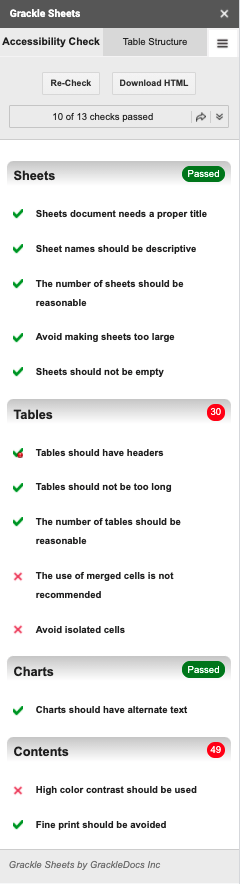
Each features a pane broken into categories with a click-and-fix interface to create more accessible files through the guided remediation tool. I’ve included an example of the pane shown for Grackle Sheets. Passed checkpoints are marked with a checkmark. Warnings are marked with a checkmark and dot. Checkpoints that require attention are marked with an “X.”
Grackle Docs includes 22 checkpoints. Grackle Slides includes 16 checkpoints. Grackle Sheets includes 13 checkpoints.